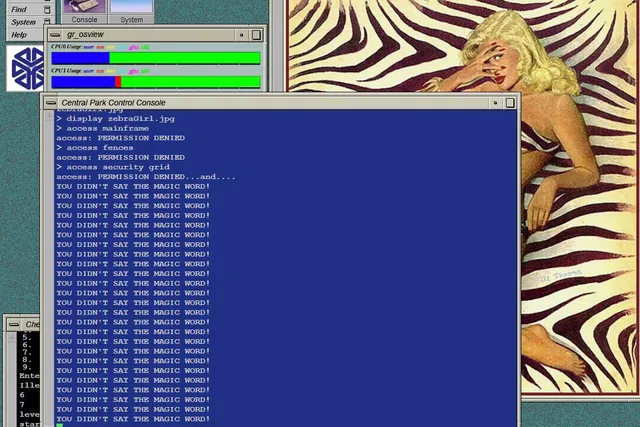
Jurassic Systems stands out as a remarkable endeavour in the world of movie-themed web simulations. Created by Tully Robinson, Jurassic Systems offers fans of the iconic 1993 film “Jurassic Park” an interactive slice of nostalgia. Here’s a closer look at what makes this web-based recreation a must-visit for fans and tech enthusiasts alike.
A Tribute to a Classic Movie Scene
Jurassic Systems is a labour of love, a meticulous HTML5/JavaScript recreation of the Irix and Macintosh environments from the original “Jurassic Park” film. It specifically emulates the memorable scene where Ray Arnold, played by Samuel L. Jackson, tries to bypass the encryption set by Dennis Nedry (Wayne Knight) on an old Irix desktop, only to be met with Nedry’s taunting Elvis-bodied avatar.
Interactive Experience
Visitors to the site can immerse themselves in this recreated scene by inputting commands like “access main security grid.” After three denied access attempts, users are greeted with Nedry’s infamous gloating, bringing a slice of the movie’s suspenseful atmosphere to life. It’s full of easter eggs!
The Project’s Reach
Jurassic Systems is more than just a website; it’s a portal back to a defining moment in cinematic history, recreated with modern technology. It’s a testament to the enduring impact of “Jurassic Park” and a delightful experience for anyone who remembers the tension and excitement of that scene. Whether you’re a fan of the film, interested in web development, or just looking for a unique online experience, Jurassic Systems is well worth the visit or the try youself.
Discover this nostalgic recreation at Jurassic Systems and revisit one of the most memorable moments from “Jurassic Park.”
Tinker yourself
Have you ever wanted to add a touch of movie magic to your website? Thanks to Tully Robinson’s Jurassic Systems, a web-based recreation of a famous scene from “Jurassic Park,” you can do just that. Here’s a simple guide on how to host Jurassic Systems on your own webspace and tweak it to your liking.
Step 1: Download the Jurassic Systems Code Firstly, head over to the GitHub repository for Jurassic Systems. Download the source code, which will include all the HTML, CSS, and JavaScript files needed to run the simulation.
Step 2: Set Up Your Web Hosting Environment Log into your Web Hosting account. If you haven’t already set up a web space, create one now. Make sure your hosting package supports HTML and JavaScript, as these are essential for running Jurassic Systems.
Step 3: Upload the Jurassic Systems Files Using an FTP client or the file manager in your control panel, upload the downloaded Jurassic Systems files to your web space. Ensure that you maintain the directory structure as it is in the GitHub repository.
Step 4: Verify the Upload Once uploaded, navigate to your domain where you’ve uploaded the files. You should see the Jurassic Systems interface. If it doesn’t appear, check to ensure all files have been uploaded correctly and the directory structure is intact.
Step 5: Customize to Your Liking Now for the fun part: customizing! You can edit the HTML to change the text displayed or tweak the CSS to alter the visual style. JavaScript files control the functionality, so if you’re comfortable with JS, you can modify how the simulation behaves.
Step 6: Test Your Changes After making your customizations, always test the website to ensure everything runs smoothly. Check if the commands work as expected and if the visual changes appear correctly.
Step 7: Going Live Once you’re satisfied with your version of Jurassic Systems, your personalized simulation is ready for visitors! Share your unique tribute to “Jurassic Park” with friends, family, or the entire internet.